
Download Forex Helper – forex trading, currency market, real-time updates, trading goals, market trends, currency strength, MT4 integration
Overview
Forex Helper is a mobile application tailored for individuals engaged in foreign exchange trading, offering tools designed to enhance decision-making through timely market insights. The app focuses on delivering real-time updates on currency strength, enabling users to respond dynamically to shifting market conditions. By tracking the most active and influential currency pairs, Forex Helper supports users in identifying potential trading opportunities as they emerge. Its primary purpose is to serve as a supplementary tool for traders seeking to maintain awareness of market trends without relying solely on full trading platforms.
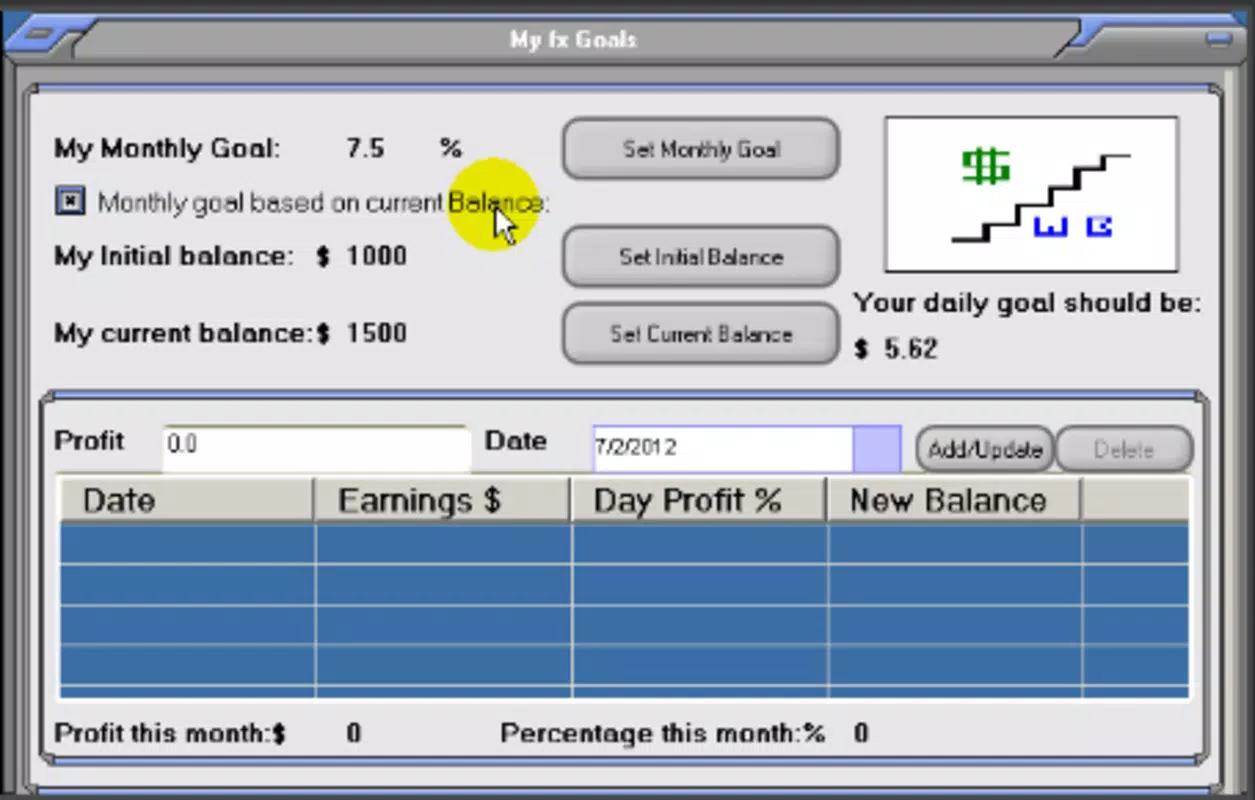
Designed specifically for forex traders, the app addresses the need for constant market monitoring and strategic planning. Users can set personalized goals—daily, weekly, or monthly—to maintain discipline and evaluate performance over time. This structured approach encourages consistent trading habits and helps users align their actions with long-term objectives. The app’s integration with the MT4 trading platform suggests it is intended for users already operating within that ecosystem, enhancing workflow efficiency by providing complementary functionality.
Although the developer did not provide additional technical details, the app’s longevity since its release on July 16, 2012, indicates a sustained presence in the finance app space. This suggests reliability and ongoing relevance for its target audience. Real-world use cases include traders using the app during market hours to quickly assess currency momentum, verify trade setups, or review performance against set targets. In the broader mobile app ecosystem, Forex Helper occupies a niche but valuable position, offering a focused utility tool for a specialized user group.
Key Features & Functionality
- Real-Time Currency Updates: The app continuously refreshes data on currency strength, providing users with up-to-the-minute insights into market dynamics. This allows traders to identify emerging trends and act promptly, especially during volatile market sessions.
- Goal Setting Functionality: Users can define specific trading goals across different timeframes—daily, weekly, or monthly. This feature promotes structured trading behavior by enabling users to measure progress and adjust strategies based on performance metrics.
- Simultaneous Operations: The app supports multiple operations at once, a feature likely intended for advanced users managing several trades or monitoring multiple currency pairs concurrently. This functionality may streamline workflows for active traders.
- MT4 Integration: Designed with compatibility in mind, Forex Helper is optimized for users who also use the MT4 trading platform. This integration enhances the overall trading experience by allowing seamless data access and coordination between tools.
These features are particularly useful in real-world scenarios such as preparing for economic news releases, where rapid assessment of currency strength can influence entry or exit timing. Traders may use the goal-setting tool to track weekly profit targets or loss limits, helping to enforce risk management discipline. The ability to run multiple operations simultaneously supports high-frequency traders or those managing diversified portfolios. While the app does not include trading execution capabilities, it serves as a strategic companion, empowering users with timely data and structured planning tools.
Interface, UX & Performance
The user interface of Forex Helper appears to be designed with functionality over flair, prioritizing clear data presentation for quick comprehension. The layout likely centers around currency strength indicators, goal tracking dashboards, and operational controls, allowing users to access critical information with minimal navigation. Visual design elements are probably straightforward, using color-coded signals to highlight strong or weak currencies, aiding rapid decision-making.
Navigation flow seems optimized for speed and efficiency, essential for traders who need to check market status during fast-moving sessions. The app’s performance on various Android devices is not formally documented, but its relatively small file size of 10.2 MB suggests efficient resource usage. Although the developer did not list formal performance metrics, the app’s long-standing availability implies consistent stability and responsiveness across compatible devices.
Responsiveness during market updates is crucial, and the app’s real-time data functionality suggests it maintains a reliable connection to market feeds. Users can expect timely refreshes without significant lag, supporting real-time decision-making. While specific feedback on battery consumption or background operation was not provided, the lightweight nature of the app may contribute to lower system impact. Overall, the user experience appears focused on utility, catering to users who value speed, clarity, and reliability over aesthetic polish.
Platform Compatibility & Technical Requirements
Forex Helper is available exclusively on the Android platform, making it accessible to users of Android smartphones and tablets. The app’s current version is 1.0.0, indicating a stable release with a foundational feature set. The file size is 10.2 MB, a compact footprint that ensures fast downloads and minimal storage usage on devices.
The developer did not specify minimum OS requirements, nor did they list compatibility details for older or newer Android versions. As a result, users should verify device compatibility through the official app store. The app is offered free of charge, removing financial barriers to access. While the exact version of Android required is not disclosed, its release date in 2012 suggests it may support older Android versions, though this cannot be confirmed without official documentation.
Pros and Cons
Pros
- Provides real-time updates on currency market trends for timely trading decisions.
- Includes goal-setting tools to promote disciplined and strategic trading behavior.
- Offers support for multiple operations, beneficial for active traders managing several positions.
- Designed with MT4 integration in mind, enhancing workflow for users in that ecosystem.
- Lightweight size (10.2 MB) ensures fast installation and minimal device impact.
- Available at no cost, making it accessible to a wide range of users.
Cons
- Specific technical requirements and OS compatibility were not disclosed.
- App does not include direct trading execution or order placement features.
- Limited information on performance under heavy usage or background operation.
- No official details on data sources or update frequency for market information.
- Only available on Android, limiting access for iOS users.
FAQ
Is Forex Helper free to download and use?
Yes, the app is available at no cost. Users can download and use all core features without any payment.
Can I use Forex Helper on iOS devices?
As of now, the app is only available on the Android platform. There is no official iOS version released.
Does the app support live trading or order execution?
No, Forex Helper does not provide live trading or order execution. It functions as a monitoring and planning tool, not a full trading platform.
How often are the currency market updates refreshed?
The app provides real-time updates, though the exact refresh interval is not specified by the developer.
Is the app safe to use with sensitive trading data?
While the app does not collect personal or financial data, users should ensure their device is secured and avoid sharing login credentials through third-party tools.
Final Thoughts + CTA
Forex Helper stands out as a focused, lightweight tool designed for traders who value real-time market insights and structured goal management. Its emphasis on currency strength tracking and integration with the MT4 platform makes it a valuable companion for dedicated forex participants. While it does not offer full trading capabilities, its ability to streamline monitoring and planning supports disciplined, informed decision-making.
Users who rely on timely market data and want to maintain consistency in their trading habits will find significant value in this app. Its free availability, compact size, and specialized functionality make it a practical addition to any trader’s toolkit. For those already using the MT4 ecosystem, the app’s compatibility enhances workflow efficiency.
Download Forex Helper now


